





Basic Operations
> Using the Touch Panel Display
> Adjusting the Brightness

| Adjusting the Brightness |
|
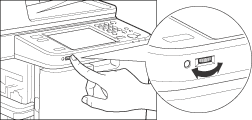
If the touch panel display is difficult to view, use the Brightness Adjustment Dial on the control panel to adjust its brightness.
|
| Remark |
|
||||||