





Basic Operations
> Volume Adjustment
> Adjusting the Alarm and Monitor Volume

| Adjusting the Alarm and Monitor Volume |
|
You can set the volume for the alarm and monitor tones that this machine sounds during a fax transmission. For information on necessary optional equipment to use this function, see "Optional Products Required for Each Function." |
| Remark |
|
|
|||||
|
 (Volume Settings) on the control panel.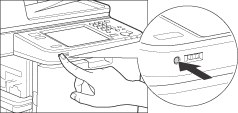
You can set the volume to any level on a scale of 0 to 9. If you set the volume all the way to the left, the volume is muted and no tone will sound. |
 ] or [
 ] to set the Alarm Volume and Monitor Volume → press [OK].