






| Duplicating/Editing a Flow to Create a Personal Flow (iW Function Flow) |
|
You can create a Personal flow using iW Function Flow based on a Shared flow created with iW Function Flow Editor.
Shared flows can be executed by all users. Personal flows can only be executed by users specified as owners of the flow. By effectively using Shared and Personal flows, you can manage flows on a user or group basis, according to your needs. |
| Required Condition |
|
 |
|
||||
|
This section describes how to duplicate and edit a flow to create a Personal flow using iW Function Flow. Follow the procedures below. Duplicating a Flow Editing a Flow |
|
Duplicating a Flow |
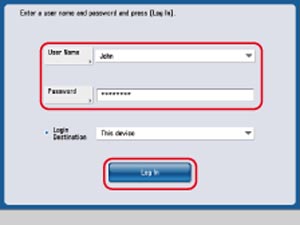
As an example, 'John' is used for [User Name], and 'password' is used for [Password].
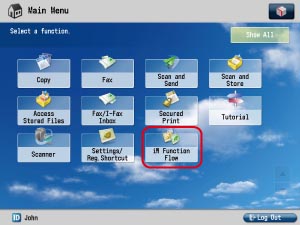
The Main Menu screen is displayed. |
|
|
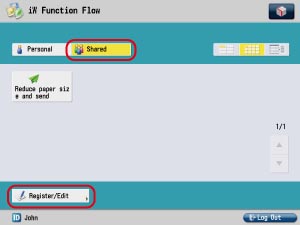
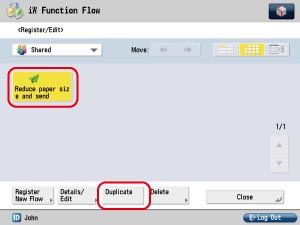
The flow is duplicated with the name [Reduce paper size and send*]. |
|
|
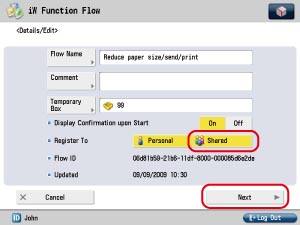
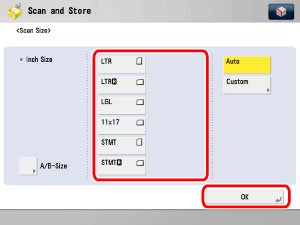
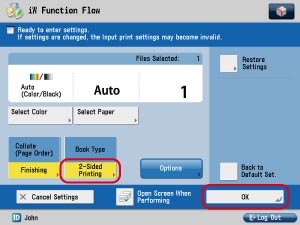
Editing a Flow Edit a duplicated Shared flow to create a Personal flow. |
If the iW Function Flow Basic Features screen is displayed, press [Register/Edit]. |
|
By pressing [Shared] and canceling the setting, the flow is registered only as a Personal flow.
|
|
|
|
|
|
|