






| Poster |
|
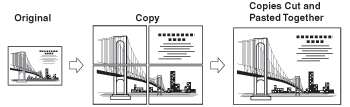
This mode enables you to enlarge an original to a size larger than A3 by copying parts of the original over several sheets of paper, and then pasting the sheets together. You can specify the copy ratio for the Poster mode by percentage, or by setting the number of output pages that the original image should be copied over.
|
| Remark |
|
|
|||||
If you create a poster by specifying the copy ratio, the number of output pages changes according to the size of the original, the copy ratio setting, and the size of the copy paper. Refer to the following table to determine the desired copy ratio. |
| Output size | Original size | Optimum paper size and sheet quantity | |||
| A3 | B4 | A4 | |||
| A0 × 2 (horizontal) | 400% | - | - | B4 | 5 × 5 = 25 sheets |
| B0 (horizontal) | 346% | 400% | - | A3 | 4 × 4 = 16 sheets |
| A0 (horizontal) | 282% | 326% | - | A3 | 3 × 3 = 9 sheets |
| B1 (horizontal) | 244% | 282% | - | B4 | 3 × 3 = 9 sheets |
| A1 (horizontal) | 200% | 230% | - | B4 | 3 × 3 = 9 sheets |
| B2 (horizontal) | 173% | 200% | - | A3 | 2 × 2 = 4 sheets |
| A2 (horizontal) | 141% | 163% | - | B4 | 2 × 2 = 4 sheets |
| B3 (horizontal) | 122% | 141% | - | A4R | 2 × 2 = 4 sheets |
| A0 (vertical) | - | - | 400% | B4 | 3 × 5 = 15 sheets |
| B1 (vertical) | - | - | 346% | A3 | 2 × 4 = 8 sheets |
| A1 (vertical) | - | - | 282% | A3 | 2 × 3 = 6 sheets |
| B2 (vertical) | - | - | 244% | B4 | 2 × 3 = 6 sheets |
| A2 (vertical) | - | - | 200% | A3 | 1 × 3 = 3 sheets |
| B3 (vertical) | - | - | 173% | A3 | 1 × 2 = 2 sheets |
| Remark |
|
|
|||||
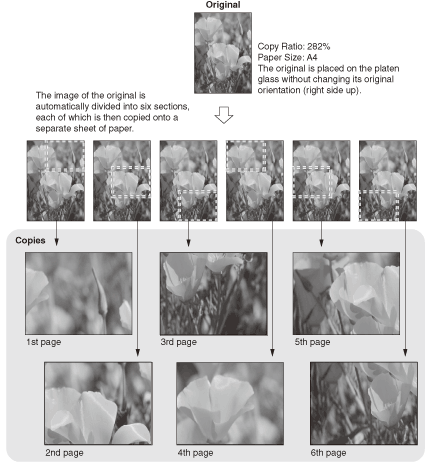
Example: Enlarging an A4 original by 282% to create an A1 vertical copy.
Based on the above criteria, the table under "Determining the Copy Ratio and Number of Sheets Needed" indicates that when using A3 paper, six pages (2 × 3) are output.
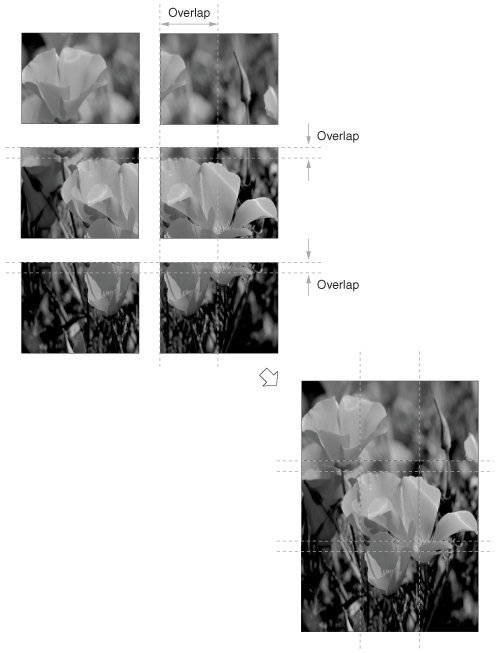
The images on neighboring sheets created by the Poster mode overlap slightly. When pasting the sheets together, trim the overlapping portions, leaving an adequate amount of overlap to apply the glue. The width of the overlapping portions differs, according to the copy ratio and paper size.
|
| Specifying the Copy Ratio in Percentage |
| Selecting the Number of Output Pages |