| |
- Press [2-Sided
 2-Sided]. 2-Sided].
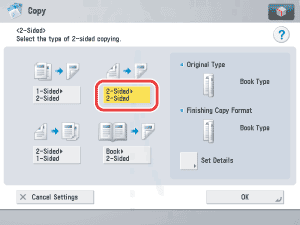
To set the orientation of the originals and the copies, press [Set Details] → select the type of two-sided orientation for the originals and the copies → press [OK].
Original
| [Book Type]: |
The front and back sides of the original have the same top-bottom orientation. |
| [Calendar Type]: |
The front and back sides of the original have opposite top-bottom orientations. |
Copy
| [Book Type]: |
The front and back sides of the copy will have the same top-bottom orientation. |
| [Calendar Type]: |
The front and back sides of the copy will have opposite top-bottom orientations. |
|








 (Start).