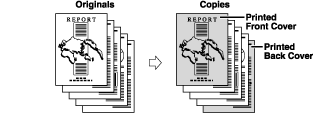
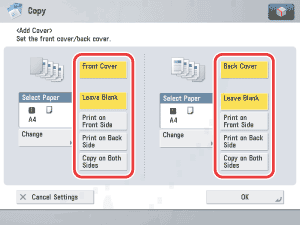
|
- If you select the Staple mode when a finisher is attached, you cannot staple more than 30 sheets of A3, B4, or A4R paper, or 50 sheets of A4 or B5 paper.
- When printing on special types of paper, such as heavy paper or transparencies, be sure to correctly set the paper type, especially if you are using heavy paper. If the type of paper is not set correctly, it could adversely affect the quality of the image. Moreover, the fixing unit may become dirty, or the paper could jam, and a service repair may be needed.
|
|
 |
|
- If you are copying on the front cover, back cover, or these sheets are included in the count of the total number of copies made. If these sheets are left blank, however, the machine's counter does not count them as copies.
- If you want to set both Add Cover and Insert Sheets, select the same paper size.
|
|