Copy > Making a Copy With the Express Copy Basic Features Screen > Enlarging/Reducing Originals to a Standard Size (Preset Zoom)

*
Enlarging/Reducing Originals to a Standard Size (Preset Zoom)

Return to Overview


For instructions on this procedure using the Regular Copy Basic Features screen, see "Preset Zoom."


Remark
  • Place your originals horizontally in the following cases:
  • If you are enlarging A4 originals to A3
  • If you are enlarging B5 originals to B4
  • If you are enlarging A5 originals to A3 (when the original is placed on the platen glass)
  • If you are reducing A3 or B4 originals to A4 or B5 with [Auto Orientation] in [Function Settings] (Settings/Registration) set to 'Off', place A4R size paper in a paper drawer, or multi-purpose tray.

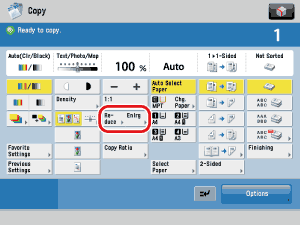
  1. To reduce, select a preset reduction ratio. To enlarge, select a preset enlargement ratio.
  1. Select the copy ratio.

  • Back To Top