Select Category
Copy
Fax
Scan and Send
Scan and Store
Access Stored Files
Fax/I-Fax Inbox
Secured Print
Web Access
Scanner
Quick Menu
Status Monitor/Cancel
Print
Network
Remote UI
MEAP
Security
Software
Select Category
All
-- Copy
Using the Machine to Send/Receive a Fax
Sending a Fax from a Computer (Windows)
-- Scan and Send
-- Scan and Store
-- Access Stored Files
-- Fax/I-Fax Inbox
-- Secured Print
-- Web Access
-- Scanner
-- Quick Menu
-- Status Monitor/Cancel
Printing from a Computer (Windows)
Printing from a Computer (Mac)
Setting the Machine (PS/PCL/UFR II Printer)
-- Network
-- Remote UI
-- MEAP
-- Security
-- Software
-- Before You Start Using This Machine
-- How to Use This Manual
-- Basic Operations
-- Optional Products
-- Settings/Registration
-- Problem Solving
-- Maintenance
-- Practical Workflows
Copy
>
Favorite Settings
> Registering Favorite Settings
*
Registering Favorite Settings
Return to Overview
Remark
You cannot store the Merge Job Blocks mode in Favorite Settings.
Press [Favorite Settings].
You can also store Favorite Settings by pressing
→ [Register Favorite Settings].
Select a button ([M1] to [M9]) for storing the settings → press [Register].
If a button already has settings registered in it,
is displayed on the left side of the button.
If you select a button without settings:
If you select a button that already has settings stored in it:
If you select a button without settings:
A screen appears, asking for your confirmation to store the settings. Press [Yes].
If you select a button that already has settings stored in it:
A screen appears, asking for your confirmation to overwrite the previous settings. Press [Yes].
Press [Cancel].
You can assign a name to the botton by pressing [Rename].
Back To Top


 → [Register Favorite Settings].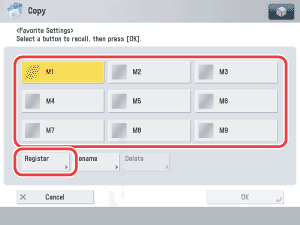
 is displayed on the left side of the button.





