Fax > Using the Machine to Send/Receive a Fax > Useful Fax Function (Options) > Copy Ratio > Preset Zoom

*
Preset Zoom

Return to Overview


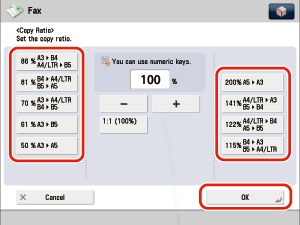
The machine offers you a variety of preset copy ratios to reduce or enlarge standard size originals to another standard record size.

  • Reduction

The available preset reduction copy ratios are:

  • A3 → B4, A4/LTR → B5 (86%)
  • B4 → A4/LTR, B5 → A5 (81%)
  • A3 → A4/LTR, B4 → B5(70%)
  • A3 → B5 (61%)
  • A3 → A5 (50%)
  • Enlargement

The available preset enlargement copy ratios are:

  • A5 → A3 (200%)
  • A4/LTR → A3, B5 → B4 (141%)
  • A4/LTR → B4, A5 → B5 (122%)
  • B4 → A3, B5 → A4 (115%)

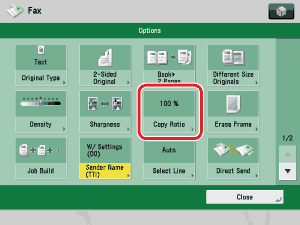
  1. Press [Options] → [Copy Ratio].

  1. To reduce the original image, select a preset reduction ratio. To enlarge the original image, select a preset enlargement ratio. Following your selection, press [OK].

  • To return the ratio to 100%, press [1:1 (100%)].

  • Back To Top