Maintenance > Staple Finisher-C1/Booklet Finisher-C1/Puncher (Optional) > Removing Punch Waste

*
Removing Punch Waste

Return to Overview


When the punch waste tray of the Puncher becomes full, a screen prompting you to remove the punch waste appears on the touch panel display. Follow the procedure described below to remove the punch waste.


Remark
  • This procedure is necessary only if the Puncher is attached.
  • The name of the puncher unit may differ according to the regions.

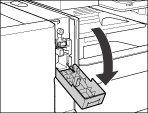
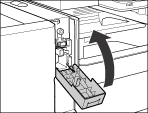
  1. Open the front cover of the punch waste tray.

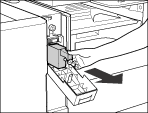
  1. Pull out the punch waste tray.

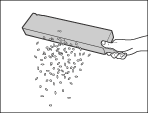
  1. Discard the punch waste.

  • Make sure that the punch waste tray is completely emptied.
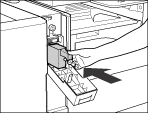
  1. Return the punch waste tray to its original position.

  • If the punch waste tray is not securely in place, you cannot make prints in the Hole Punch mode.
  1. Close the front cover of the punch waste tray.

  • When closing the front cover of the punch waste tray, be careful not to get your fingers caught, as this may result in personal injury.

  • Back To Top