Maintenance > Replacing the Waste Toner Container
*
Replacing the Waste Toner Container

When the waste toner container is full, the message <Replace the waster toner container.> appears on the touch panel display. Follow the instructions on the touch panel display, and the procedure described below to help you replace the waste toner container.

If you press [Close], you can continue operations, such as setting modes and scanning originals, even if you do not replace the waste toner container immediately.


Remark
  • Do not burn or throw used waste toner containers into open flames. Also, do not store waste toner containers in places exposed to open flames, as this may cause the toner to ignite, resulting in burns or a fire.
  • Your local authorized Canon dealer will dispose of the used waste toner container.
  • Used toner cannot be reused. Do not mix new and used toner together.
  • Use only waste toner containers intended for use with this machine.
  • Do not replace the waste toner container before the message prompting you to replace it appears on the touch panel display.
  • When attaching the waste toner container, make sure to push it in all the way. If the container is not pushed in all the way when you remove it, it may come out with its shutter open. Since this may cause toner to fly out, close the shutter with your hand.
  • Complete instructions on how to replace the waste toner container can be accessed by pressing [Previous] or [Next] on the touch panel display.
  • If the waste toner container must be replaced during a print job, the remaining prints are made after the new waste toner container is installed.

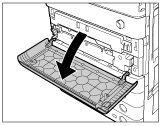
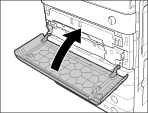
  1. Open the front cover, holding both sides.

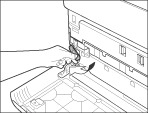
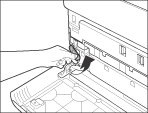
  1. Lower the locking lever.

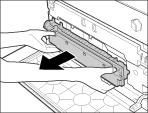
  1. Pull out the waste toner container.

  • When removing the waste toner container, be careful not to tilt it, as the toner may spill and get onto your hands or clothing. If toner gets onto your hands or clothing, wash them immediately with cold water. Washing them with warm water will set the toner, and make it impossible to remove the toner stains.
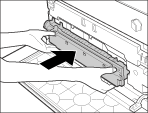
  1. Insert the new waste toner container.

  1. Return the locking lever to its original position.

  1. Close the front cover of the main unit.

  • When closing the front cover, be careful not to get your fingers caught, as this may result in personal injury.

  • Back To Top