Maintenance
> Routine Cleaning
> Platen Glass and Cover

| Platen Glass and Cover |
|
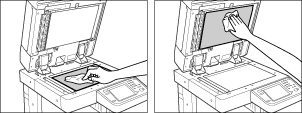
Clean the platen glass and the underside of the platen cover by following the procedure below. |
| Remark |
|
 |
|
||||
|






| Platen Glass and Cover |
|
Clean the platen glass and the underside of the platen cover by following the procedure below. |
| Remark |
|
|
|
||||
|