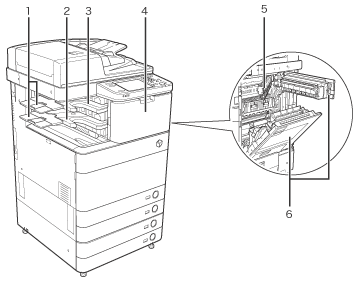
| 1 |
Auxiliary Tray
If you are printing on large size paper, such as A3, B4, or A4R, pull out the auxiliary tray. |
2 |
Output Tray
Paper is output to the output tray. |
| 3 |
Inner Finisher Additional Tray-A1
The Inner Finisher Additional Tray-A1 can be attached to the Inner Finisher-A1 to provide an additional paper output tray. |
4 |
Front Cover
Open this cover to replace the staple cartridge in the stapler unit, or to clear a staple jam. |
| 5 |
Paper Output Unit
Pull out the paper output unit to remove jammed paper. |
6 |
Main Unit's Upper Right Cover, Main
Unit's Lower Right Cover
Open this cover when clearing a paper jam inside the main unit. |