Optional Products > Inner Finisher-A1 > Finishing Modes
*
Finishing Modes

Return to Overview


The Inner Finisher-A1 is equipped with the following finishing modes.


Remark
  • If the Collate or Group mode is set, the output tray moves downward as the stack of paper that is output increases in quantity and thickness. Once the output tray has reached its stacking limit, printing stops temporarily. Remove all of the prints from the output tray, and printing resumes.

  • Collate Mode

The prints are automatically collated into sets arranged in page order. The collated print sets can be shifted by pressing [Offset].

  • Group Mode

All prints of the same original page are grouped together. The grouped print sets can be shifted by pressing [Offset].

  • Offset Mode

The print output is shifted alternately to the front and back of the tray, in a vertical (portrait) orientation, or a horizontal (landscape) orientation depending on the orientation of your originals. For example, if you place A4R originals, the paper is output and shifted in the horizontal direction. If you place A4 originals, the paper is output and shifted in the vertical direction.


Remark
  • If you press [Offset] when either the Collate or Group mode is set, each set of prints is shifted approximately 30 mm before it is delivered to the output tray.

  • Staple Mode

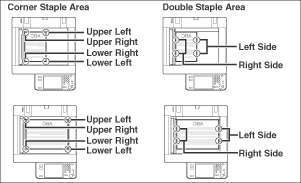
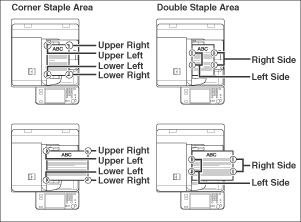
The prints are automatically collated into sets arranged in page order and stapled. Prints are stapled in the following places:

  • If an original is placed on the platen glass:

  • If originals are placed in the optional feeder:


Remark
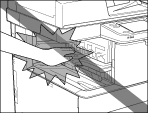
  • Do not place your hand in the part of the tray where stapling is performed if a finisher is attached, as this may result in personal injury.

  • Do not place your hands on the finisher when the finisher is in use. Doing so may result in personal injury or damage to the finisher.
  • Since the trays of the finisher move during copying/printing, do not place anything under the trays, as doing so may damage the trays.
  • If the Staple mode is set, the output tray moves downward as the stack of paper that is output increases in quantity and thickness. Once the output tray has reached its stacking limit, or after 30 sets of prints have been output, printing and stapling stop temporarily. When all of the stapled prints from the output tray are removed, printing and stapling resume.
  • The following paper sizes can be stapled: A3, B4, A4, A4R, or B5
  • You cannot staple envelopes, transparencies, tracing paper, or labels.
  • The maximum number of sheets (including cover sheets) that can be stapled together is 30 sheets for A3, B4, or A4R paper, and 50 sheets for A4, or B5 paper.
  • If the machine stops while stapling and the message <Load staples.> appears, almost all of the staples have been used, and the staple cartridge must be replaced. To proceed, replace the staple cartridge. (See "Maintenance.")

The following are paper sizes that can be output from the output trays of the machine. However, some paper sizes may not be output depending on the set functions.

: Available -: Unavailable

Paper Size Output Tray
305 × 457 mm
SRA3
A3
A4
A4R
A5
A5R
B4
B5
B5R
Envelope COM10 No.10
Monarch
DL
ISO-B5
ISO-C5
Nagagata 3
Yougatanaga 3
Kakugata 2
Custom Size 99 mm × 139.7 mm to 320 mm × 457.2 mm

  • Back To Top