|
|
- Card Reader-C1 and Copy Card Reader-F1 cannot be attached at the same time.
- If you are using a login service other than default authentication, the Limit Functions mode will not be available.
- If SSO-H is set as the login service, you cannot use the Card Reader-C1/Copy Card Reader-F1.
- If the Main Menu screen does not appear on the touch panel display when the control card is inserted, make sure that:
- The control card is inserted in the correct direction.
- The control card is inserted as far as it can go.
- An unusable control card is not inserted. (For example, cards, which are damaged or cards prohibited from use.)
- Insert a usable control card correctly.
|
|
|
|
- Copy Card Reader-F1 may not be available depending on the region.
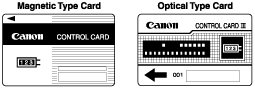
- If the Card Reader-C1 is attached, the card shown on the right can be used. The card can manage up to 1,000 departments.
|
|
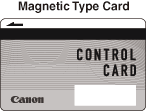
- If the Copy Card Reader-F1 is attached, the card shown on the right can be used. The card can manage up to 1,000 departments.
|
|
|
|







 : Available