Select Category
Copy
Fax
Scan and Send
Scan and Store
Access Stored Files
Fax/I-Fax Inbox
Secured Print
Web Access
Scanner
Quick Menu
Status Monitor/Cancel
Print
Network
Remote UI
MEAP
Security
Software
Select Category
All
-- Copy
Using the Machine to Send/Receive a Fax
Sending a Fax from a Computer (Windows)
-- Scan and Send
-- Scan and Store
-- Access Stored Files
-- Fax/I-Fax Inbox
-- Secured Print
-- Web Access
-- Scanner
-- Quick Menu
-- Status Monitor/Cancel
Printing from a Computer (Windows)
Printing from a Computer (Mac)
Setting the Machine (PS/PCL/UFR II Printer)
-- Network
-- Remote UI
-- MEAP
-- Security
-- Software
-- Before You Start Using This Machine
-- How to Use This Manual
-- Basic Operations
-- Optional Products
-- Settings/Registration
-- Problem Solving
-- Maintenance
-- Practical Workflows
Optional Products
>
Color Image Reader Unit-B2
> Parts and Their Functions
*
Parts and Their Functions
Return to Overview
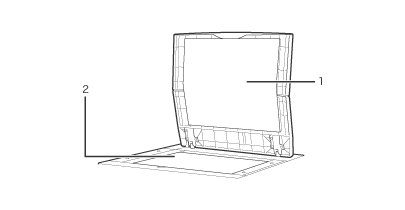
1
Platen Cover
Close the platen cover to secure originals that have been placed on the platen glass.
2
Platen glass
Use the platen glass when scanning books, thick originals, thin originals, transparencies, etc.
Back To Top