





Print
> Setting the Machine (PS/PCL/UFR II Printer)
> PCL Settings
> Enlarge A4 Print Width

| Enlarge A4 Print Width |
|
This setting determines whether to expand the printable area of A4 size paper to that of Letter size in width. If [On] is selected, all the area on a page 4.23 mm from the top and bottom edges and 3.39 mm from the left and right edges is available for printing on A4 paper. Only the width increases. If [Off] is selected, all the area on a page 4.23 mm from the top, bottom, left, and right edges is available for printing on A4 paper.
|
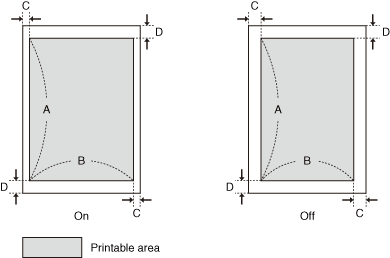
| Settings | On | Off |
| A: Length | 288.54 mm | |
| B: Width | 203.22 mm | 201.54 mm |
| C: Left and right edges | 3.39 mm | 4.23 mm |
| D: Top and bottom edges | 4.23 mm | |
| Remark |
|
|
|||||