






| Advanced Box |
|
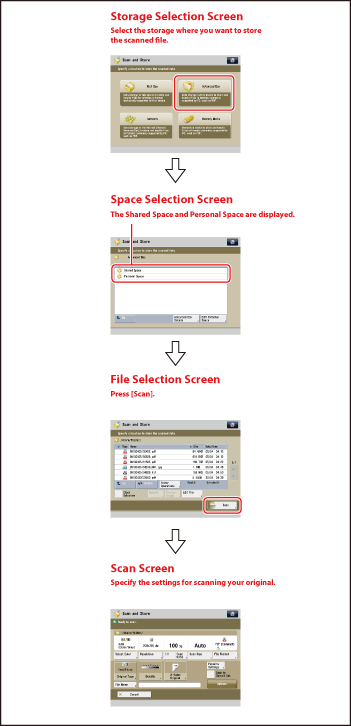
The flow of basic scan and store operations is shown below.
|
| Remark |
|
|
|||||
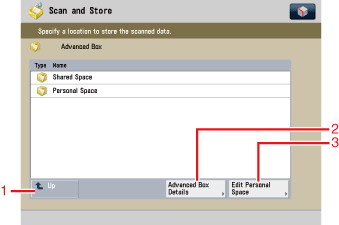
The screen below, which appears when you select [Advanced Box], is called the Space Selection screen.
|
|
| Remark |
|
||||||
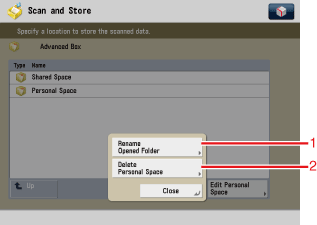
When you press [Edit Personal Space] on the Space Selection screen, the screen below appears, which is called the Edit Personal Space screen.
|
|
| Remark |
|
|
|||||
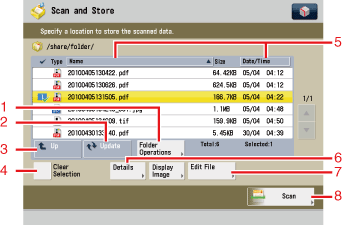
The screen below, which appears when you select the desired space or folder, is called the File Selection screen. A list of folders and files in the selected space is displayed.
|
|
| Remark |
|
|
|||||
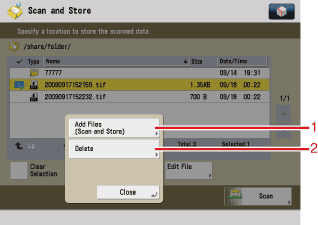
When you press [Edit File] on the File Selection screen, the screen below appears, which is called the Edit File screen.
|
|
| Remark |
|
||||||
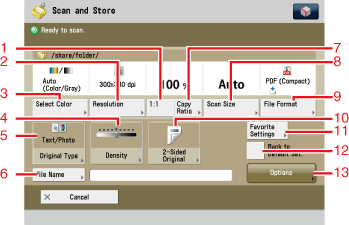
The screen below, which appears when you select a file and press [Scan] on a File Selection screen, is called the Scan screen.
|
|