|
- You cannot scan highly transparent originals, such as transparencies, using the Auto setting on the Copy Ratio screen. Use the Preset Zoom or Zoom by Percentage mode instead.
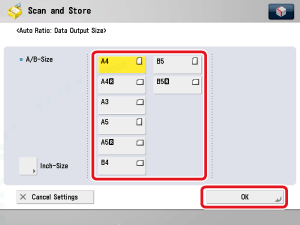
- To use the Auto setting on the Copy Ratio screen, your originals must conform to one of the standard paper sizes: A3, B4, A4, A4R, B5, B5R, A5, A5R, or A6R. (You can place A6R originals only on the platen glass.)
- If you notice a difference between the automatic zoom ratio and the actual record size when storing a file in a mail box, you can try to eliminate this error in [Fine Adjust Zoom]. (See "Fine Adjust Zoom.")
|
|
|
|
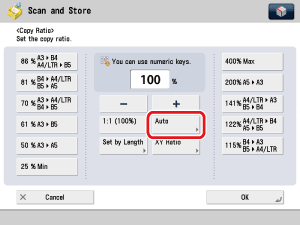
- When storing a file in a mail box, to cancel this setting, press [Copy Ratio] → [Auto] → [Cancel Settings].
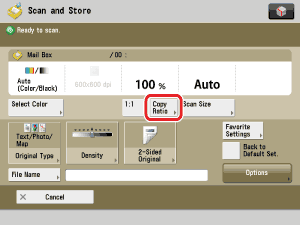
- As an example, the procedure for scanning an original and storing it in a mail box is explained in this section.
|
|







 (Start).