Scan and Send > Useful Send Function (Options) > 2-Sided Original

*
2-Sided Original

Return to Overview


You can scan both sides of a two-sided documents loaded in the feeder.

For information on the optional products required to use this function, see "Optional Products Required for Each Function."


Remark
  • The 2-Sided Original mode cannot be set with the Book 2 Pages mode or when [Custom] is selected for the scan size.
  • When you are scanning originals with a horizontal (landscape) orientation, such as A4R, make sure to place them horizontally into the feeder. If these originals are placed vertically, the back sides of these originals are scanned upside down.
  • To cancel this setting, press [Options] → [2-Sided Original] → [Cancel Settings].

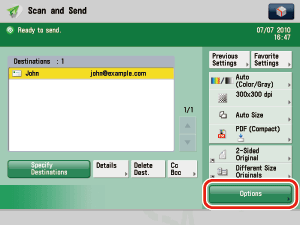
  1. Place your originals into the feeder and specify the destination → press [Options].

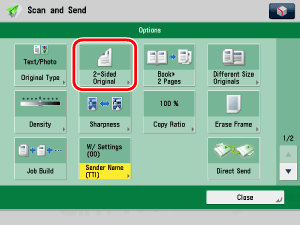
  1. Press [2-Sided Original].

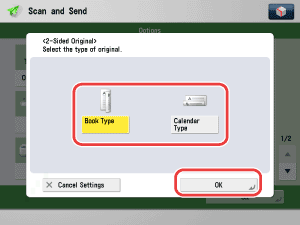
  1. Select the type of original → press [OK].

Details of each item are shown below.

[Book Type]: The front and back sides of the original have the same top-bottom orientation.
[Calendar Type]: The front and back sides of the original have opposite top-bottom orientations.

  • Back To Top