| Inserting Sheets |
|
This mode enables you to set the machine to automatically add sheet insertions, chapter pages, or tab paper using a different type of paper from that used for the main document. In addition, you can decide whether the sheet insertions and tab paper are printed on as well. Chapter pages are always printed on. |
| Remark |
|
 |
|
||||
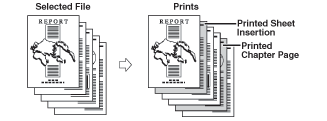
This setting inserts a sheet of paper between prints. The Sheet Insertion mode is useful when you want to use a blank sheet to help sort out the prints. You may also print on the sheet insertions. Since the chapter page is always printed on one side, the Chapter Page mode is useful when you want to organize the prints by chapter.
|
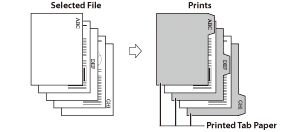
This setting inserts sheets of tab paper into the prints. This is convenient when sorting the body of documents etc.
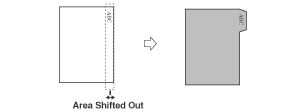
To print on the tab paper, set the shift width of the image to be printed on the tabs.
|
| Remark |
|
|
|
||||||
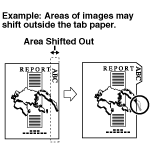
|
|
|
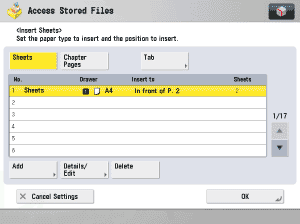
You cannot select [Sheets] and [Chapter Pages] at the same time. If you want to select [Tab], load the tab paper in the Multi-Purpose Tray or Paper Drawer 2. Select [Tab] on the Select Paper screen → press [Number of Tabs]. Specify the number of tabs → press [OK]. |
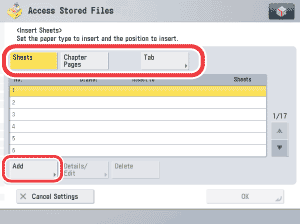
|
 -
-  (numeric keys).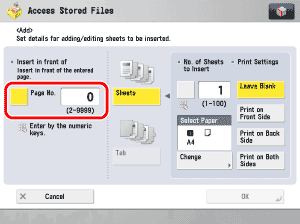
Press [Change] → select the paper source that contains the paper you want to insert. If you selected [Sheets], set the number of sheets to insert, and the side to print on. If you selected [Tab], set the print shift width (0 mm to 25 mm) using [-] or [+] → press [OK].
|
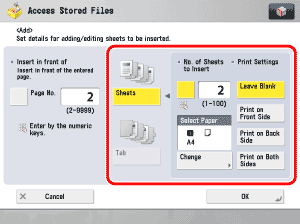
Repeat steps 4 to 7, as necessary.
|