Web Access > URL History > Displaying the URL History

*
Displaying the URL History

Return to Overview


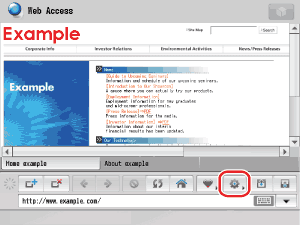
  1. Press [] (Menu).

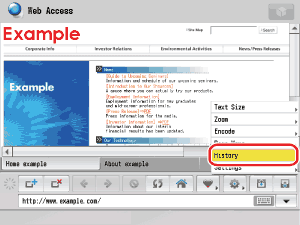
  1. Press [History].

  • When <Restrict History Display> is set to 'On' in Privacy Policy and Regulations (from the Settings screen), it is not possible to display the URL history. (See "Privacy Policy and Regulations Settings.")

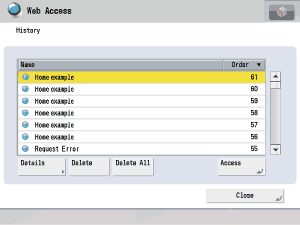
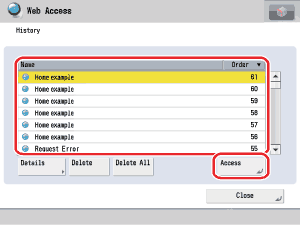
The URL history list is displayed.

  • Depending on the Web page, the name may be left blank.
  • If a PDF file is displayed, the name is left blank.
  • Select [Name] or [Order] to sort the URL history list in ascending or descending order.
  • If multiple windows are open, URL histories are saved in the order that the windows were open.
  • If you want to check the detailed information:
  • If you want to display a Web page from the URL history list:

  • If you want to check the detailed information:
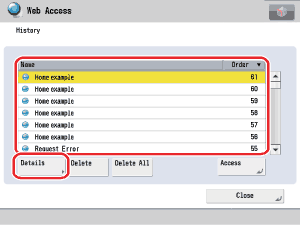
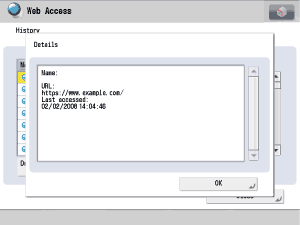
  • Select the desired Web page from the URL history list → press [Details].

The detailed information of the selected Web page is displayed.

The following details are displayed:

[Name]: The name of the selected Web page
[URL]: The URL of the selected Web page
[Last accessed]: The date and time when the selected Web page was last accessed
  • When <Dept. ID/User Name with History> is set to 'On' in Privacy Policy and Regulations (from the Settings screen), the Department ID or user name is also displayed. (See "Privacy Policy and Regulations Settings.")

  • If you want to display a Web page from the URL history list:
  • Select the desired Web page from the URL history list → press [Access].

The selected Web page is displayed.


  • Back To Top