





Web Access
> Uploading Mail Box Document
> Selecting Mail Box Document

| Selecting Mail Box Document |
|
You can upload the mail box document to the server by using the upload function for the files in the display contents. |
| Remark |
|
||||||
|
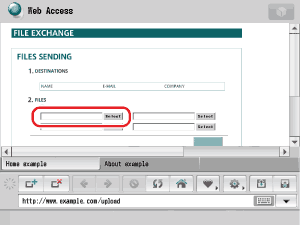
If a password is set for the selected mail box list,enter the password. The list of mail boxes is displayed when [Select] is pressed. The list of mail boxes is displayed when [Select] is pressed. |
If a password is set for the specified Mail Box, enter the password. The list of documents is displayed when you press [Select]. Up to 100 documents are displayed on the list of documents. |
File name is displayed on the specified file list after it is changed to a PDF file. Example:"file01.pdf" "file02.pdf" |
|