Settings/Registration > Preferences > Paper Settings > Registering the Paper Type for the Paper Source

*
Registering the Paper Type for the Paper Source

Return to Overview


To "Settings/Registration Table"

This setting enables you to register the paper type for each paper source.


Remark
  • Be sure to correctly set the paper type. If the type of paper is not set correctly, it could adversely affect the quality of the image. Moreover, the fixing unit may become dirty and require a service repair, or the paper could jam.
  • You can also specify the paper type from the Status Monitor/Cancel screen. (See "Status Monitor/Cancel.")

  1. Press (Settings/Registration) → [Preferences] → [Paper Settings] → [Paper Settings].
  1. Select the paper source in which you want to register the paper type → press [Set].

If a paper drawer is selected, you can enter the paper size by pressing [Custom Size].

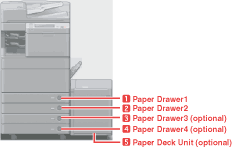
The numbers on the screen represent the following paper sources:


The Cassette Feeding Unit-AD1 and Paper Deck Unit-B1 are attached.

  1. Select the desired paper type → press [OK].

Make sure that you load the same type of paper in the paper source as the one you registered.

  • For more information on papers, see "Basic Operations."
  • You can register a paper type that is not listed in [Detailed Settings] in the Multi-Purpose Tray Settings: Selecting the Paper Type screen. For details on registering paper types, see "Registering/Editing Custom Paper Types."
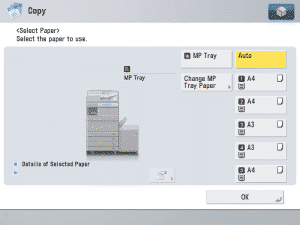
  • The registered paper type information is displayed through the use of icons on the paper selection screen, as shown below.

  • Back To Top