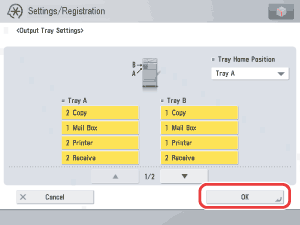
Settings/Registration > Function Settings > Common > Paper Output Settings > Output Tray Designation

*
Output Tray Designation

Return to Overview


To "Settings/Registration Table"

You can designate the machine's output trays to be used for specific functions.

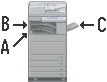
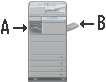
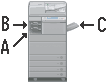
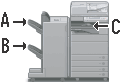
The output trays indicated by Tray A, B, and C vary according to the attached optional products.


Options Attached Default Settings Tray A/B/C
Inner 2 Way Tray-F1 Tray A: Copy, Access Stored Files
Tray B: Printer, Receive/Fax, Other
Inner 2 Way Tray-F1 and Copy Tray-J1 Tray A: Copy, Access Stored Files
Tray B: Printer
Tray C: Receive/Fax, Other
Inner Finisher-A1 and Inner Finisher Additional Tray-A1 Tray A: Copy, Access Stored Files
Tray B: Printer, Receive/Fax, Other
Inner Finisher-A1 and Copy Tray-J1 Tray A: Copy, Access Stored Files, Printer
Tray B: Receive/Fax, Other
Inner Finisher-A1, Inner Finisher Additional Tray-A1, and Copy Tray-J1 Tray A: Copy, Access Stored Files
Tray B: Printer
Tray C: Receive/Fax, Other
Staple Finisher-C1 or Booklet Finisher-C1, and Buffer Pass Unit-G1 Tray A: Copy, Access Stored Files
Tray B: Printer
Tray C: Receive/Fax, Other
Tray Home Position: Tray A

Remark
  • The same output tray can be designated for multiple functions.
  • The priority order of the output destinations is determined by the order of the selected output trays. The priority is displayed as "1," "2," and "3."

  1. Press (Settings/Registration) → [Function Settings] → [Common] → [Paper Output Settings] → [Output Tray Settings].
  1. Set the output and priority settings for Trays A/B/C → press [OK].


[Other] is used for designating a tray for printing reports.

If the fax board is installed, [Fax] is displayed.

If the Super G3 2nd Line Fax Board and the Super G3 3rd/4th Line Fax Board are installed, you can set up to four fax lines (Fax Line 1 to 4).

If you want to use an output tray for only one function, select only that function.

  • If a certain tray reaches its stacking limit, the machine automatically uses another tray that is designated for the same function. However, it is recommended that you only designate one tray for fax/I-fax documents to prevent them from getting lost.
  • If the Inner Finisher-A1 and Copy Tray-J1 are attached and the Staple mode is set, the sheets are output to Tray A, regardless of the Tray Designation settings.
  • If the Inner Finisher-A1 and Copy Tray-J1 are attached and the following paper is selected, the sheets are output to trays other than the Copy Tray-J1, regardless of the Tray Designation settings: nonstandard, envelopes, heavy paper, transparencies, labels, or tracing paper.
  • If the Inner 2 Way Tray-F1 and Copy Tray-J1 are attached and the following paper is selected, the sheets are output to trays other than the Copy Tray-J1, even if the Copy Tray-J1 is specified as the destination: nonstandard, envelopes, heavy paper, transparencies, labels, or tracing paper.
  • If you want to select the tray home position (when the Staple Finisher-C1, Booklet Finisher-C1, or Inner Finisher-A1 and Inner Finisher Additional Tray-A1 are attached):

  • If you want to select the tray home position (when the Staple Finisher-C1, Booklet Finisher-C1, or Inner Finisher-A1 and Inner Finisher Additional Tray-A1 are attached):
  • Press the Tray Home Position drop-down list → select the tray home position to be used while jobs are being processed.

Tray Home Position

[Tray A]: Tray A moves closer to the output area.
[Tray B]: Tray B moves closer to the output area.
[Off]: The tray home position is not set. The output tray stops at the position it is in when printing finishes.

  • Back To Top