| Storing Shortcut Buttons |
|
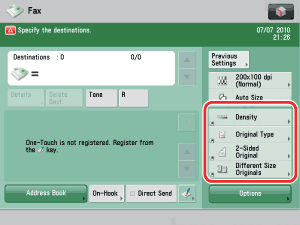
To "Settings/Registration Table" You can store shortcut buttons that are displayed on the Fax screen. You can store up to four desired buttons from [Options]. This feature is useful when you want to store frequently used settings. For information on the optional products required to use this function, see "Optional Products Required for Each Function." |
|
 (Settings/Registration) → [Function Settings] → [Send] → [Fax Settings] → [Register Options Shortcuts].
To cancel the storing of a shortcut button, select [Unassigned]. |
Example: The stored shortcut buttons are displayed as shown below.
|