






| Registering Sender Names |
|
To "Settings/Registration Table" For fax, you can register any name as the Sender Name, such as the section or department's name, or an individual's name. The registered Sender Name can be displayed on the touch panel display of the receiving party's machine and/or printed at the top of the documents that you send as the sender's information. For information on the optional products required to use this function, see "Optional Products Required for Each Function." |
| Remark |
|
||||||
|
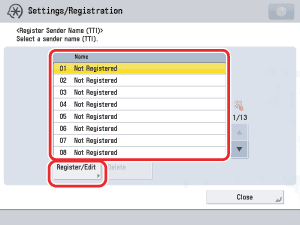
 (Settings/Registration) → [Function Settings] → [Send] → [Fax Settings] → [Register Sender Name (TTI)].
You can store up to 99 sender names (01 to 99). To delete a stored Sender Name, select the number under which the name is registered → press [Delete]. Only one sender name can be deleted at a time. |
|