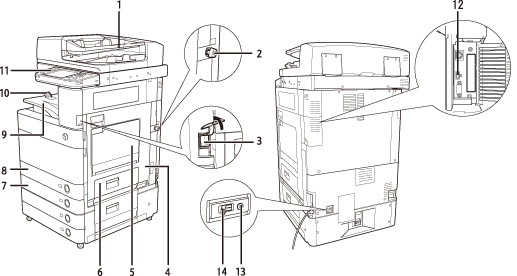
| 1 |
Feeder (Optional)
Originals placed in the feeder are fed one sheet at a time to the platen glass for scanning. |
2 |
Security Key (Optional)
For managing the use of the machine and preventing unauthorized copies. |
| 3 |
Main Power Switch
Press to the "I" side to turn the power ON. (See "Main Power and Control Panel Power.") |
4 |
Main Unit's Right Cover
Open this cover when clearing a paper jam inside the main unit. (See "Problem Solving.") |
| 5 |
Multi-Purpose Tray
Use the multi-purpose tray to feed paper manually, and for loading nonstandard paper stock, such as envelopes. (See "Basic Operations.") |
6 |
Paper Drawer's Right Cover
Open this cover when clearing a paper jam in Paper Drawers 1 and 2.
|
| 7 |
Paper Drawer 2
Holds up to 550 sheets of paper (80 g/m2). |
8 |
Paper Drawer 1
Holds up to 550 sheets of paper (80 g/m2). |
| 9 |
Output Tray
Prints and copies are output to this tray.
|
10 |
Output Paper Tray Guide
Tilt the output paper tray guide up to prevent output papers from falling down.
|
| 11 |
Control Panel
Includes the keys, touch panel display, and indicators required for operating the machine. (See "Control Panel Parts and Functions.")
|
12 |
USB Port
Use the USB port to connect external hard disks and other devices to the machine. |
| 13 |
Test Button
Press this button to periodically test the circuit breaker. (See "Getting Started.")
|
14 |
Breaker
Detects excess current or leakage current. (See "Getting Started." ) |