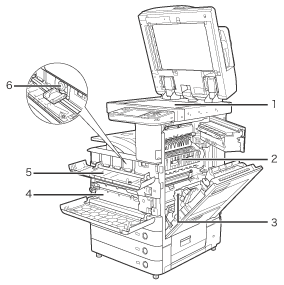
| 1 |
Platen Glass
Use the platen glass when scanning books, thick originals,thin originals, transparencies, etc. |
2 |
Fixing Unit's Upper Cover
Open this cover to clear a paper jam in the fixing unit. (See
"Problem Solving.") |
| 3 |
Duplexing Unit
Pull out the duplexing unit to clear a paper jam. (See
"Problem Solving.") |
4 |
Waste Toner Container
Collects the waste toner. |
| 5 |
Toner Replacement Cover
Open this cover to replace the toner cartridge. |
6 |
Toner Cartridge
When toner runs out, pull out the toner cartridge, and replace it with a new one. Toner cartridges are sold separately (not standard equipment). (See "Maintenance.") |