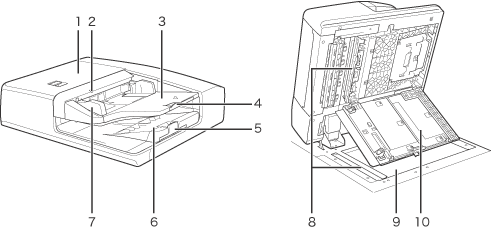
| 1 |
Feeder Cover
Open this cover when clearing a paper jam.
(See "Problem Solving.") |
2 |
Original Set Indicator
Lights when originals are placed in the original supply tray. |
| 3 |
Original Supply Tray
Originals placed here are automatically fed sheet by sheet into the feeder. Place originals into this tray with the surface that you want to scan face up. |
4 |
Auxiliary Original Supply Tray
Pull out this tray when feeding large sized paper. |
| 5 |
Auxiliary Original Output Tray
Pull out this tray when outputting large sized paper. |
6 |
Original Output Tray
Originals that have been scanned from the original supply tray are output into the original output tray in the order that they are fed in the feeder. |
| 7 |
Slide Guides
Adjust the slide guides to match the width of the original. |
8 |
Document Feed Scanning Area
Scans documents sent from the feeder. |
| 9 |
Platen glass
Use the platen glass when scanning books,
thick originals, thin originals, transparencies, etc. |
10 |
Inner Cover
Open this cover when clearing a paper jam.
(See "Problem Solving.") |