Status Monitor/Cancel > From the Log Screen > From the Receive Screen
*
From the Receive Screen

Return to Overview


This section describes the operations that can be performed from the Receive Log screen.


  1. Press (Status Monitor/Cancel) → [Receive].

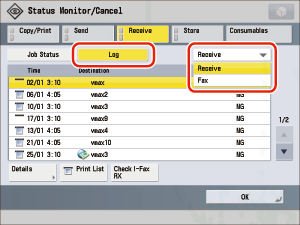
  1. Press [Log] → select the type of job whose log you want to check from the drop-down list.


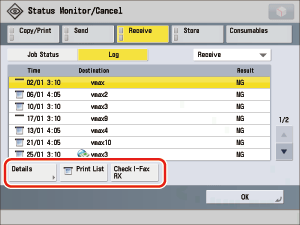
  1. Perform the required operation.

  • To check the details of a Receive job:
  • To print the Receive Log list:
  • To check whether an I-fax has been received by the POP server:

  • To check the details of a Receive job:
  • Select the desired job → press [Details].

  • To print the Receive Log list:
  • Press [Print List] → [Yes].
  • The log can be printed only if A3, B4, A4 or A4R (plain, recycled, thin, or color paper) is loaded in one of the paper sources that is set to 'On' when [Other] is pressed to select a paper source in [Paper Drawer Auto Selection On/Off] in [Function Settings] (Settings/Registration). (See "Setting the Paper Drawer Auto Selection On/Off.") However, if [Consider Paper Type] for Copy is set to 'On' in [Paper Drawer Auto Selection On/Off] in [Function Settings] (Settings/Registration), you cannot print from a paper source with color paper specified.

  • To check whether an I-fax has been received by the POP server:
  • Press [Check I-Fax RX].

If an I-fax has been received by the POP server, reception starts.

  • To use [Check I-Fax RX], set POP to 'On' in [Communication Settings] in [Function Settings] (Settings/Registration), and specify the settings for the POP server. (See "Common Communication Settings for E-Mail/I-Fax.")
  • If [POP Interval] is set to something other than '0' in [Communication Settings] in [Function Settings] (Settings/Registration), reception is automatically checked at the set interval. (See "Common Communication Settings for E-Mail/I-Fax.")
  • Reception is automatically performed when I-faxes are received with SMTP without going via a server. It is not necessary to check reception. SMTP reception settings are specified in [Communication Settings] in [Function Settings] (Settings/Registration). (See "Common Communication Settings for E-Mail/I-Fax.")

  • Back To Top