






| Setting the Paper Drawer Auto Selection On/Off |
|
To "Settings/Registration Table" Paper sources for which Paper Drawer Auto Selection is set to 'On' are used for Automatic Paper Selection and Auto Drawer Switching. You can set which paper sources can be used for Automatic Paper Selection and Auto Drawer Switching with each function, such as copying and printing.
|
| Remark |
|
|
|||||
Paper sources with Paper Drawer Auto Selection set to 'On' and loaded with the following paper types, are eligible for use with Automatic Paper Selection and Auto Drawer Switching.
|

Paper sources with Paper Drawer Auto Selection set to 'On' and loaded with following paper types, are eligible for use with Automatic Paper Selection and Auto Drawer Switching.
|
Paper sources with Paper Drawer Auto Selection set to 'On' and loaded with the following paper types, are eligible for use with Automatic Paper Selection and Auto Drawer Switching.
If you perform printing without changing settings on the machine, perform the same operations as Printer (Printing from a Computer). If you change settings on the machine and print, perform the same operations described for printing scanned documents stored in the machine. |
Paper sources with Paper Drawer Auto Selection set to 'On' and loaded with the following paper types, are eligible for use with Automatic Paper Selection and Auto Drawer Switching.
|
Paper sources with Paper Drawer Auto Selection set to 'On' and loaded with A3, B4, A4, A4R, B5, B5R, A5, or A5R size paper, are eligible for use with Automatic Paper Selection and Auto Drawer Switching. The available paper types are shown in the table below.
|
Paper sources with Paper Drawer Auto Selection set to 'On' and loaded with A3, B4, A4, or A4R size paper, are eligible for use with Automatic Paper Selection and Auto Drawer Switching. The available paper types are shown in the table below.
|
|
 (Settings/Registration) → [Function Settings] → [Common] → [Paper Feed Settings] → [Paper Drawer Auto Selection On/Off].
If the fax board is installed, [Receive/Fax] is displayed. [Other] is used for specifying the paper source for printing reports. If you select [Copy], you can set [Consider Paper Type] to 'On' or 'Off'. |
Details of each item are shown below.
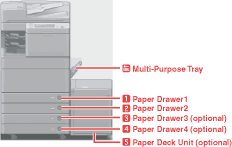
The numbers on the screen represent the following paper sources:
|
 ) will not be displayed on the paper selection screen.