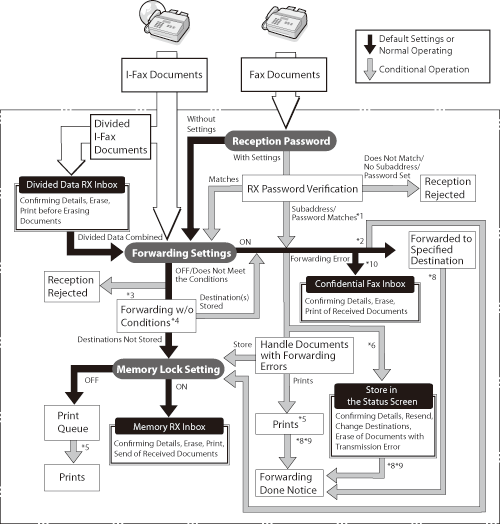
When the machine receives I-fax/fax documents, they are processed as shown below:
| *1 |
If the subaddress and password attached to the received document match the information registered in [Forwarding Settings] in [Common Settings] in [Receive/Forward] in [Function Settings] (Settings/Registration), the documents are forwarded to their forwarding destinations regardless of the reception password setting. |
| *2 |
If Store/Print Received File in [Forwarding Settings] in [Common Settings] in [Receive/Forward] in [Function Settings] (Settings/Registration) is set to 'On', forwarded documents are either printed or stored in the Memory RX Inbox. |
| *3 |
If the subaddress and password attached to the received document do not match the information registered in [Forwarding Settings] in [Common Settings] in [Receive/Forward] in [Function Settings] (Settings/Registration), the document is rejected. |
| *4 |
If Forward w/o Conditions is set up in [Forwarding Settings] in [Common Settings] in [Receive/Forward] in [Function Settings] (Settings/Registration), all received documents that do not match the specified forwarding conditions are forwarded to the destination selected for Forward w/o Conditions. |
| *5 |
If documents are received while paper is jammed, or paper or toner has run out, it is printed after the paper jam is cleared, paper is loaded, or toner is added. |
| *6 |
If [Delete Failed TX Jobs] in [Common Settings] in [Send] in [Function Settings] (Settings/Registration) is set to 'Off', the status of any job with a forwarding error will be saved on the Status Monitor/Cancel screen. |
| *7 |
Documents with forwarding errors are handled as follows, depending on the settings for [Handle Files with Forwarding Errors] in [Common Settings] in [Receive/Forward] in [Function Settings] (Settings/Registration):
- [Always Print]: All documents with forwarding errors are printed.
- [Store/Print]: Documents with forwarding errors are stored in the Memory RX Inbox when Memory Lock is turned 'On'. If Memory Lock is turned 'Off', the documents are printed.
|
| *8 |
If <Fwd Done Notice> is specified in [Forwarding Settings] in [Function Settings] (Settings/Registration), a notification e-mail is sent when the forwarding job completes successfully. |
| *9 |
If <Fwd Done Notice> is specified in [Forwarding Settings] in [Function Settings] (Settings/Registration) and <Notice Only for Errors> is also specified, a notification e-mail is sent only when the document fails to be forwarded. |
| *10 |
The received fax/I-fax documents can be stored in a Confidential Fax Inbox by specifying the Confidential Fax Inbox as the forwarding destination. Only the received documents that match the specified forwarding conditions can be stored in a Confidential Fax Inbox. |