Problem Solving > Clearing Paper Jams > Cassette Feeding Unit-AD1 (Optional)
*
Cassette Feeding Unit-AD1 (Optional)

Return to Overview


If a paper jam occurs inside the Cassette Feeding Unit-AD1, a screen prompting you to remove the jammed paper appears on the touch panel display. Check the location of the paper jam, and follow the procedure described below, and the procedure that appears on the touch panel display, to remove the jammed paper.


Remark
  • There are some areas inside the machine which are subject to high-voltages. When removing jammed paper or when inspecting the inside of the machine, do not allow necklaces, bracelets, or other metal objects to touch the inside of the machine, as this may result in burns or electrical shock.
  • When removing jammed paper, take care not to cut your hands on the edges of the paper.
  • If paper is jammed inside the cassette feeding unit, make sure to remove any jammed paper from inside the lower right cover first. Removing jammed paper from the cassette feeding unit first may tear the jammed paper, and leave pieces of the paper jammed inside the machine.

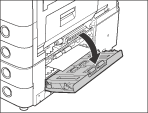
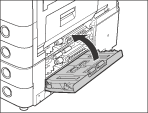
  1. Open the lower right cover of the cassette feeding unit.

If the Paper Deck Unit-B1 is attached to the main unit, move the paper deck away from the main unit before proceeding with this procedure. For more information, see "Optional Products."

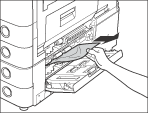
  1. Remove any jammed paper.

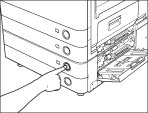
  1. Press and release the button on the paper drawer indicated on the touch panel display.

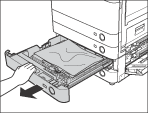
  1. Grip the handle, and pull out the paper drawer until it stops.

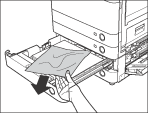
  1. Remove any jammed paper.

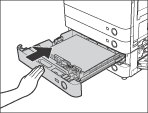
  1. Gently push the paper drawer back into the machine until it clicks into place in the closed position.

  • When returning the paper drawer to its original position, be careful not to get your fingers caught, as this may result in personal injury.
  1. Close the lower right cover of the cassette feeding unit.

If the Paper Deck Unit-B1 was moved away from the main unit, reconnect it to the main unit. For more information, see "Optional Products."

  • When closing the lower right cover of the cassette feeding unit, be careful not to get your fingers caught, as this may result in personal injury.
  1. Follow the instructions on the touch panel display.
  • The screen indicating the location of the paper jam repeatedly appears on the touch panel display until the paper jam is entirely cleared. For more information, see "Screens Indicating the Locations of Paper Jams."

  • Back To Top