Problem Solving > Clearing Staple Jams > Inner Finisher-A1 (Optional)

*
Inner Finisher-A1 (Optional)

Return to Overview


If a staple jam occurs in the Inner Finisher-A1, a screen prompting you to remove the jammed staples appears on the touch panel display. Check the location of the staple jam, and follow the procedure described below, and the procedure that appears on the touch panel display, to remove any jammed staples.


Remark
  • Make sure to close all covers and paper drawers of the machine before clearing any staple jams.

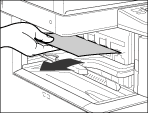
  1. Remove the jammed paper in the finisher's output tray and the paper that is still waiting to be stapled.

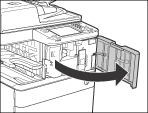
  1. Open the front cover of the finisher.

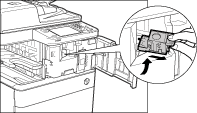
  1. Pull out the staple case, holding it by the green tab.

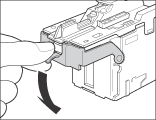
  1. Push down the tab on the staple case.

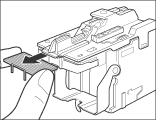
  1. Remove all of the staples that slide from the staple case.

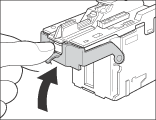
  1. Return the tab on the staple case to its original position.

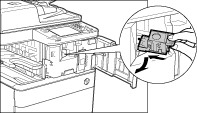
  1. Gently push the staple case back into the finisher until it is securely in place.

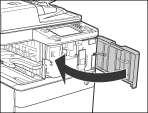
  1. Close the front cover of the finisher.

  • When closing the front cover of the finisher, be careful not to get your fingers caught, as this may result in personal injury.
  • If there are no staples ready for stapling after the cover is closed, the stapler unit automatically performs a "dry" stapling operation to reposition the staples.

  • Back To Top