Settings/Registration > Function Settings > Send > Common Settings > Communication Management Report
*
Communication Management Report

Return to Overview


To "Settings/Registration Table"

The Communication Management Report is a printed log that shows the results of send and receive jobs. The Communication Management Report can be printed at a specified time or it can be printed automatically when the number of send and receive transmissions reaches 100. The send and receive logs can also be printed separately.

A Communication Management Report can be printed manually from the Status Monitor/Cancel screen. (See "Status Monitor/Cancel.")


Remark
  • The reports can be printed only if A3, B4, A4, or A4R (plain, recycled, thin, or color paper) is loaded in a paper source whose settings in [Other] in [Paper Drawer Auto Selection On/Off] in [Function Settings] (Settings/Registration) are set to 'On'. However, if [Consider Paper Type] for [Copy] is set to 'On' in [Paper Drawer Auto Selection On/Off], you cannot print from a paper source with color paper specified. (See "Setting the Paper Drawer Auto Selection On/Off")
  • If [Display Log] in [Management Settings] (Settings/Registration) is set to 'Off', [Communication Management Report] is not displayed.
  • If [Display Log] in [Management Settings] (Settings/Registration) is changed from 'Off' to 'On', the following settings are switched to 'Off' automatically:
  • Auto Print (100 Transmissions)
  • Specify Print Time
  • If the fax board is installed or the Remote Fax Kit is activated, a list of the fax and mail box transmission logs is printed.
  • When the message <Check the printer. Call service representative.> is displayed to indicate that the Print function is unavailable, the machine automatically prints an Activity Report after it recovers from the problem. The latest 100 communication results are printed on the report.
  • For an example of a Communication Management Report, see Chapter 17, "Appendix," in Getting Started.

  1. Press (Settings/Registration) → [Function Settings] → [Send] → [Common Settings] → [Communication Management Report].
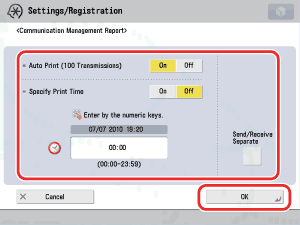
  1. Specify each setting → press [OK].

<Auto Print (100 Transmissions)>:

[On]: The Communication Management Report is automatically printed when the number of send and receive transmissions reaches 100.
[Off]: The Communication Management Report is not automatically printed when the number of send and receive transmissions reaches 100.

<Specify Print Time>:

[On]: The Communication Management Report is printed at the specified time.
[Off]: The Communication Management Report Time setting is not specified.

Enter all four digits of the time (including zeros), using 24-hour notation.

Examples: 7:05 a.m. → 0705
11:18 p.m. → 2318

If you make a mistake when entering the time, press (Clear) to clear your entry → enter another four digit number.

If the number of send and receive transmissions exceeds 100 before the specified time, a Communication Management Report of the most recent 100 transmissions is printed.

<Send/Receive Separate>:

To print the send and receive logs separately, press [Send/Receive Separate] to select it.

If it is not necessary to print the send and receive logs separately, do not press [Send/Receive Separate].


  • Back To Top